
Basic File Artwork Specifications
You’re only a few steps away from having your order sent to the presses!
Detailed here are the business card file artwork specifications and guidelines.
Correct artwork ensures 100% satisfaction and quality reproduction of your order so that you and your recipients will be impressed.
The following should form part of the artwork submitted to CardsDirect.com.au.
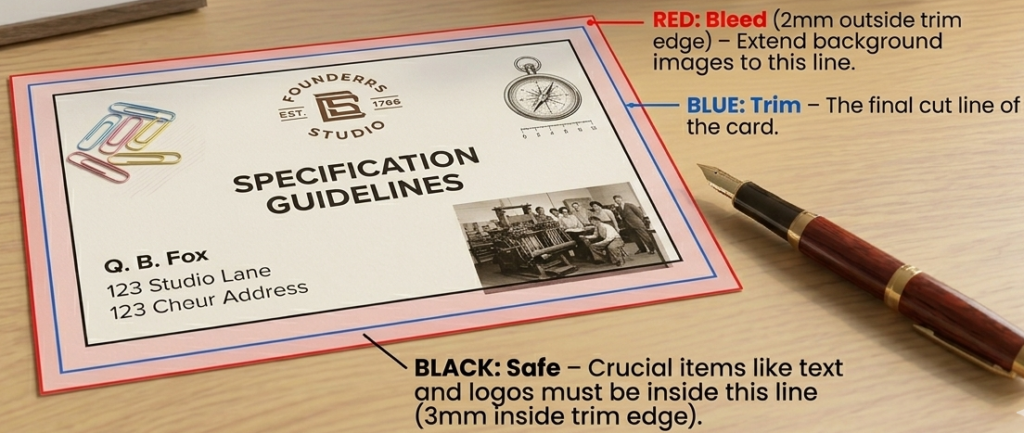
Bleed Guidelines:
RED: Bleed (2mm outside trim edge) – absolute extremities of the card. This is where for example, a background image should extend to.
BLUE: Trim – where the final card cut will take place.
BLACK: Safe – All crucial card items should be inside this area (3mm inside Bleed edge).
[Please supply with crop marks on artwork]
Furher File Artwork Specifications Guide
- CMYK colours.
- PDF with trim boxes and a separate page for each content item (e.g front/back – see further below).
- Text converted to curves/outlined or Fonts embedded.
- Scans to correct size and resolution.
- Minimum 300dpi.
- Trim size matches your order.
- Flatten transparencies or saved as PDF v1.3.
Your proof needs to be as detailed as possible, indicating (where applicable):
- Card front & back.
- Referencing of orientation front/back and inside/outside.
- Application of the finish – (inc. size, score(s), perforation, sequential numbering, holes, die cuts, round corners drilled/die cut, magnet positing).
- Metal-X requires an additional spot silver colour channel named “Pantone 877 C”.Copy all CMYK colour information to this layer by adjusting the Curves.
- Delete all areas that will not be metallic.
- Save image as Photoshop DCS.2, PDF or PSD to retain the 5th colour.
Files provided outside of these business card file artwork specifications may not appear as intended. If you require the above formatting to be done, please add “CardsDirect Artwork” to your product order in the online shop page.
To minimise disappointment, your order will not be processed until a proof comprising these above elements have been supplied and approved.
Given our experience and expertise we usually detect any abnormalities, however the responsibility is ultimately with you/your designer. See our Terms of Use and Conditions page for more information.
These artwork guidelines also apply to stationery packages including letterheads and with compliments slips and other branded products,
Of course, sometimes best to send us a quick email to info@cardsdirect.com.au
Yours in print,
The CardsDirect.com.au Team